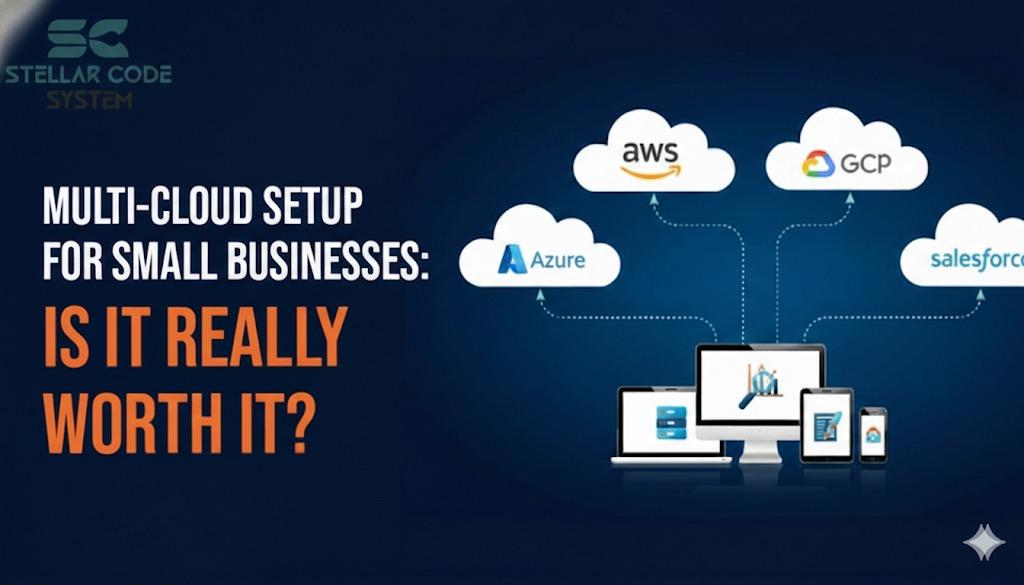
Multi-Cloud Setup for Small Businesses: Is It Really Worth It?
Introduction
I’ve lost count of how many times a founder told me, “We should go multi-cloud so we’re not locked in.”
Usually this comes after one AWS outage, a scary billing spike, or a Medium article someone read at 1 a.m.
The problem isn’t that multi-cloud is bad.
The problem is small teams underestimate what it actually costs them in time, focus, and risk.
Let’s talk about when multi-cloud helps — and when it quietly makes things worse.
Why this problem actually happens

Multi-cloud usually enters the conversation for three reasons:
Fear of Vendor Lock-In
Businesses worry about becoming too dependent on a single platform or provider, making it difficult to switch later. Vendor lock-in can limit flexibility, increase long-term costs, and restrict innovation. Choosing open standards and portable architectures helps reduce this risk and keeps your options open.
Fear of Outages
System downtime can disrupt operations, damage customer trust, and lead to lost revenue. Even short outages may affect user experience and brand reputation. Implementing redundancy, backups, and reliable infrastructure ensures higher availability and minimizes downtime risks.
Fear of Future Scale
Many teams worry their current systems won’t handle growing traffic or user demands. Poor scalability can cause slow performance, crashes, or expensive rebuilds later. Designing with scalable cloud solutions and modular architecture prepares your platform for smooth growth.
All valid fears. But in small teams, the decision rarely comes from real constraints. It comes from pressure.
In early startups and small agencies, I’ve seen this pattern a lot:
One or Two Senior Devs
Small teams often rely on one or two experienced developers to handle everything from architecture to deployment. While this keeps costs low, it can slow progress and create bottlenecks. Knowledge sharing and clear priorities help avoid burnout and delays.
No Dedicated DevOps Person
Without a dedicated DevOps role, developers must manage infrastructure, deployments, and monitoring themselves. This can reduce focus on product development and increase mistakes. Simple automation tools and managed services can bridge the gap efficiently.
Infra Decisions Made Alongside Feature Work
Infrastructure choices are often made reactively while building features, rather than through proper planning. This can lead to quick fixes and technical debt over time. Taking time to design scalable foundations saves effort and rework later.
Founders Reading Advice Written for Companies 10× Their Size
Startup founders sometimes follow strategies meant for large enterprises with bigger teams and budgets. This leads to overengineering and unnecessary complexity. Focusing on lean, practical solutions suited to your current stage delivers better results.
So teams try to “future-proof” early.
The result? They design infrastructure for problems they don’t have yet, while creating new ones they do have now.
Multi-cloud sounds like risk reduction. In practice, it often shifts risk from vendors to your own team.
Where most developers or teams get this wrong
1. Assuming cloud portability is mostly theoretical
On paper, everything is “portable.”
In reality:
IAM Models Are Different
Each cloud provider structures Identity and Access Management in its own way, with unique roles, policies, and permissions. This makes migrations and multi-cloud setups more complex. Teams must carefully map access controls to avoid security gaps or over-permissioning.
Networking Behaves Differently
Cloud networking concepts like VPCs, subnets, and routing vary across platforms. Configurations that work in one environment may not translate directly to another. Understanding these differences is key to maintaining performance and connectivity.
Managed Services Are Never Equivalent
Managed databases, storage, and compute services may seem similar but often differ in features, limits, and integrations. Switching providers can require redesign or compromise. Evaluating capabilities early helps prevent unexpected trade-offs.
Terraform Configs Grow Fast and Get Fragile
As infrastructure scales, Terraform files become larger and harder to manage. Poor structure can lead to duplication, errors, and risky changes. Modular design and clean organization keep configurations maintainable and reliable.
I’ve seen teams promise “we can move anytime” while being deeply coupled to:
AWS ALB Behavior
AWS Application Load Balancers have unique routing rules, health checks, and scaling behaviors. Misconfigurations can cause uneven traffic distribution or unexpected downtime. Understanding these specifics ensures reliable performance and smoother deployments.
GCP IAM Quirks
GCP’s IAM structure relies heavily on predefined roles and project-level permissions, which can feel restrictive or confusing. Small mistakes may grant too much or too little access. Careful role mapping and testing help maintain security and control.
Azure-Specific Monitoring
Azure uses its own monitoring ecosystem, including tools like Azure Monitor and Application Insights. Metrics, logs, and alerts are structured differently from other clouds. Proper setup is essential to gain clear visibility into system health and performance.
They could move — after months of work and downtime planning.
That’s not portability. That’s deferred pain.
2. Copying enterprise advice without enterprise resources
Most multi-cloud success stories assume:
Dedicated Platform Teams
Dedicated platform teams focus on managing infrastructure, tools, and developer environments. This allows product teams to concentrate solely on building features. It improves reliability, consistency, and faster delivery across projects.
Strong SRE Practices
Site Reliability Engineering (SRE) practices emphasize stability, automation, and measurable reliability goals. Teams use SLAs, monitoring, and incident response to reduce downtime. This ensures systems stay resilient even under heavy load.
Mature CI/CD Pipelines
Well-built CI/CD pipelines automate testing, building, and deployments with minimal manual effort. This reduces errors and speeds up release cycles. Consistent automation leads to faster and safer product updates.
24/7 Monitoring Coverage
Round-the-clock monitoring helps detect issues before users are affected. Alerts and on-call support enable quick responses to outages or performance drops. Continuous visibility keeps applications reliable and customer trust intact.
Small teams don’t have that.
In startups, multi-cloud usually means:
More Configs to Maintain
As systems grow, the number of configuration files, environments, and settings increases rapidly. Managing them becomes time-consuming and prone to errors. Standardization and automation help keep complexity under control.
More Failure Modes
Adding more services and integrations introduces additional points where things can break. Small issues in one component can cascade into larger outages. Proper testing, monitoring, and redundancy reduce the impact of failures.
More “Only One Person Understands This” Risk
When critical knowledge lives with a single team member, it creates a major bottleneck and risk. If they’re unavailable, troubleshooting slows down significantly. Documentation, shared ownership, and knowledge transfer improve team resilience.
I’ve watched teams double their operational surface area without doubling their capacity.
That gap always shows up later.
3. Believing outages are solved by multi-cloud alone
Outages don’t magically disappear because you use two providers.
Most downtime I’ve seen in small teams came from:
Bad Deploys
Poorly tested or rushed deployments can introduce bugs, downtime, or broken features. Without rollback plans, recovery becomes stressful and slow. Automated testing and staged releases help ensure safer deployments.
Misconfigured Networking
Incorrect firewall rules, routing, or DNS settings can block traffic or expose systems to risks. These issues often cause unexpected outages or performance problems. Clear network design and regular audits prevent costly mistakes.
Expired Certs
SSL/TLS certificates that aren’t renewed on time can break secure connections and trigger browser warnings. This damages user trust and may block access entirely. Automated renewals and monitoring keep certificates valid.
Broken Secrets Rotation
Failing to rotate API keys, tokens, or passwords increases security vulnerabilities over time. Manual processes are easy to forget and prone to errors. Automated secret management ensures credentials stay secure and up to date.
Multi-cloud doesn’t fix any of that.
Sometimes it makes incident response slower because now you’re debugging two platforms under pressure.
Practical solutions that work in real projects

Instead of asking “Should we go multi-cloud?”, I push teams to answer a simpler question:
What risk are we actually trying to reduce right now?
Before adding tools or complexity, identify the biggest threat to your business today—whether it’s downtime, slow releases, security gaps, or scaling issues. Solving problems you don’t yet have wastes time and resources. Focus on mitigating the most immediate, high-impact risks first to move faster and stay efficient.
Here’s what has worked in real projects.
1. Start single-cloud, design for exit (lightly)
Pick one provider and commit.
But:
Avoid Deeply Niche Managed Services Early
Specialized cloud services can seem convenient but often create tight dependencies on one provider. Migrating away later becomes costly and complex. Start with simpler, widely supported services to keep flexibility.
Keep Business Logic Out of Cloud-Specific Glue
Embedding core logic directly into provider-specific tools or workflows makes your app harder to move or refactor. It couples your product to the infrastructure too tightly. Keep business rules portable and platform-agnostic whenever possible.
Use Containers Where It Actually Helps, Not Everywhere
Containers are great for consistency and portability, but overusing them adds operational overhead. Not every workload needs containerization. Apply them strategically where they solve real deployment or scaling challenges.
This gives you:
Speed
Simpler architecture and fewer dependencies mean faster development and releases. Teams spend less time managing infrastructure and more time shipping features. Execution becomes smoother and more predictable.
Fewer Unknowns
Reducing complexity lowers the number of hidden risks and surprises in production. Systems become easier to debug and maintain. Clear setups lead to more reliable outcomes.
A Realistic Exit Path If You Ever Need It
Portable designs make it easier to switch providers or adjust your stack later. You avoid being trapped by hard-to-replace services. This flexibility protects you as your business evolves.
Trade-off:
You Accept Some Lock-In
Using any cloud platform means accepting a degree of dependency. Trying to avoid all lock-in can overcomplicate your system. A small, intentional trade-off is often practical.
You Gain Focus and Execution Speed
By not overengineering for hypothetical future moves, your team stays focused on building value now. Faster decisions and simpler systems accelerate growth. Momentum often matters more than perfect portability.
For most teams under 10 devs, this is a net win.
2. Separate “reliability” from “multi-cloud”
If uptime is the concern, focus here first:
Better Monitoring and Alerts
Clear monitoring helps you spot issues before users are affected. Smart alerts focus on real problems, not noise, so teams can respond quickly. Good visibility keeps systems reliable and reduces firefighting.
Safer Deploy Strategies
Techniques like staged rollouts, canary releases, and feature flags reduce the risk of breaking production. Changes are tested gradually instead of all at once. This makes deployments more controlled and predictable.
Rollback Discipline
Every release should have a quick and reliable way to revert if something goes wrong. Fast rollbacks minimize downtime and customer impact. Practicing this process builds confidence during deployments.
Simple Runbooks
Runbooks provide clear, step-by-step instructions for handling common incidents. They reduce guesswork and speed up troubleshooting, especially during high-pressure situations. Simple documentation helps the whole team respond effectively.
I’ve seen single-cloud systems with 99.99% uptime because teams invested in basics instead of platform sprawl.
Multi-cloud without operational maturity just gives you more ways to fail.
3. Use multi-cloud tactically, not everywhere
When multi-cloud does make sense, it’s usually narrow:
One Cloud for Core App
Keeping your main application on a single cloud simplifies architecture, billing, and operations. It reduces complexity and helps teams move faster with fewer integration issues. Focus stays on building features instead of managing multiple platforms.
Another for Backups or Analytics
Using a secondary provider for backups or analytics adds redundancy without overcomplicating your core stack. It protects critical data and enables experimentation safely. This approach balances resilience with practicality.
Secondary Provider for DNS or CDN
DNS and CDN services are easy to distribute across providers for extra reliability. If one vendor has issues, traffic can still flow smoothly. This improves uptime without heavy operational overhead.
This limits blast radius without exploding complexity.
Example I’ve shipped before:
App + DB in One Cloud
Hosting your application and database in the same cloud reduces latency and simplifies networking. It makes deployments, monitoring, and troubleshooting easier for the team. Keeping core systems together improves performance and operational clarity.
Backups Replicated Cross-Cloud
Replicating backups to another cloud protects your data from provider-specific outages or disasters. It adds an extra layer of resilience without complicating daily operations. This ensures you can recover quickly if the primary environment fails.
DNS Outside the Primary Provider
Managing DNS with an independent provider prevents your app from being tied to a single cloud’s availability. If the main cloud goes down, you can still redirect traffic easily. This setup improves uptime and gives you greater control during incidents.
That setup was boring — and boring is good.
4. Delay the decision until it hurts to wait
A good rule I use:
If moving clouds would cost less than 2–3 months of focused work, you’re not locked in yet.
Most early teams are nowhere near that threshold.
By the time you are:
Revenue Exists
Once the product is generating steady revenue, you can justify investing in stronger infrastructure and tooling. Spending becomes strategic rather than speculative. Financial stability reduces risk and supports smarter scaling decisions.
Team Is Bigger
A larger team allows for clearer role separation, such as DevOps, SRE, or platform ownership. Work is distributed more efficiently, reducing bottlenecks and burnout. This improves execution speed and overall system reliability.
Decisions Are Driven by Data, Not Fear
Choices based on real metrics and usage patterns lead to better outcomes than reacting to hypothetical risks. Data helps prioritize what truly matters for growth and stability. This keeps the team focused on solving real problems, not imagined ones.
When this approach does NOT work

Single-cloud isn’t always the right call.
Multi-Cloud Can Make Sense When:
Multi-cloud isn’t always necessary early on, but certain situations justify the added complexity. When business, legal, or scale requirements demand flexibility, spreading across providers becomes strategic rather than optional.
You Have Regulatory or Data Residency Constraints
Some industries require data to stay within specific regions or jurisdictions. Using multiple clouds helps meet compliance rules without limiting operations. It ensures legal safety while maintaining performance for local users.
A Major Customer Requires It
Enterprise clients may mandate hosting across specific providers for redundancy or policy reasons. Supporting multi-cloud can help secure and retain these high-value contracts. In such cases, the business benefit outweighs the extra complexity.
You Already Operate at Significant Scale
At large scale, even small outages can have major financial impact. Multi-cloud adds resilience and reduces dependency on a single provider. The operational overhead becomes manageable with mature systems and processes.
You Have Infra Specialists, Not Generalists
Managing multiple clouds requires deep expertise in networking, security, and automation. Dedicated infrastructure specialists can handle this complexity effectively. Without that skill set, multi-cloud often slows teams down instead of helping.
If you’re running:
A Financial Platform
Financial systems handle sensitive transactions and must meet high security and compliance standards. Downtime or data loss can directly impact money and customer trust. Strong reliability and safeguards are critical from day one.
A Gov-Adjacent Product
Products serving government or public sector clients often face strict regulatory, security, and hosting requirements. Compliance rules may dictate where and how data is stored. Infrastructure decisions must prioritize auditability and control.
A System With Strict Availability SLAs
When uptime commitments are contractually defined, even small outages can lead to penalties or lost clients. High availability, redundancy, and fast recovery processes become essential. The system must be designed to minimize risk at every layer.
Then yes — multi-cloud may be justified earlier.
But for most startups and small agencies, those aren’t day-one problems.
Best practices for small development teams

If you take one thing away, let it be this:
Complexity is a cost — even when it looks like safety.
A few rules I’ve learned the hard way:
Optimize for Team Clarity, Not Theoretical Flexibility
Clear, simple systems are easier for teams to understand and operate. Over-optimizing for hypothetical future needs often adds confusion. Prioritize setups your team can confidently manage today.
Prefer Boring Infrastructure Over Clever Setups
Proven, well-understood tools fail less and are easier to debug. Clever architectures may look impressive but increase risk and maintenance effort. Boring infrastructure keeps systems stable and predictable.
Make Decisions Reversible, Not “Perfect”
Trying to make flawless choices upfront slows progress and increases anxiety. Focus on options you can change later with minimal cost. Reversible decisions support faster learning and iteration.
Revisit Infra Decisions Every 6–12 Months, Not Weekly
Constantly changing infrastructure creates churn and instability. Regular, scheduled reviews allow informed adjustments without disrupting delivery. This balance keeps systems evolving without slowing execution.
The best teams I’ve worked with weren’t cloud-agnostic.
They were focused.
Conclusion:
Multi-cloud isn’t a badge of technical maturity.
For small teams, it’s often a distraction from the real work: shipping, stabilizing, and learning what actually matters.
If you’re under 10 developers, single-cloud done well usually beats multi-cloud done poorly.
Reduce risk by improving fundamentals first.
Add complexity only when reality — not fear — demands it.
FAQs
For most early-stage startups, no. It adds operational overhead before the benefits are real.
Not by itself. Most outages in small teams come from deployment and configuration issues.
Keep core logic decoupled, avoid niche services early, and accept some lock-in as a trade-off.
When regulatory, customer, or scale requirements force the decision — not before.
No. Terraform helps provisioning, but it doesn’t remove service-level coupling.
About the Author
Paras Dabhi
VerifiedFull-Stack Developer (Python/Django, React, Node.js) · Stellar Code System
Hi, I’m Paras Dabhi. I build scalable web applications and SaaS products with Django REST, React/Next.js, and Node.js. I focus on clean architecture, performance, and production-ready delivery with modern UI/UX.

Paras Dabhi
Stellar Code System
Building scalable CRM & SaaS products
Clean architecture · Performance · UI/UX